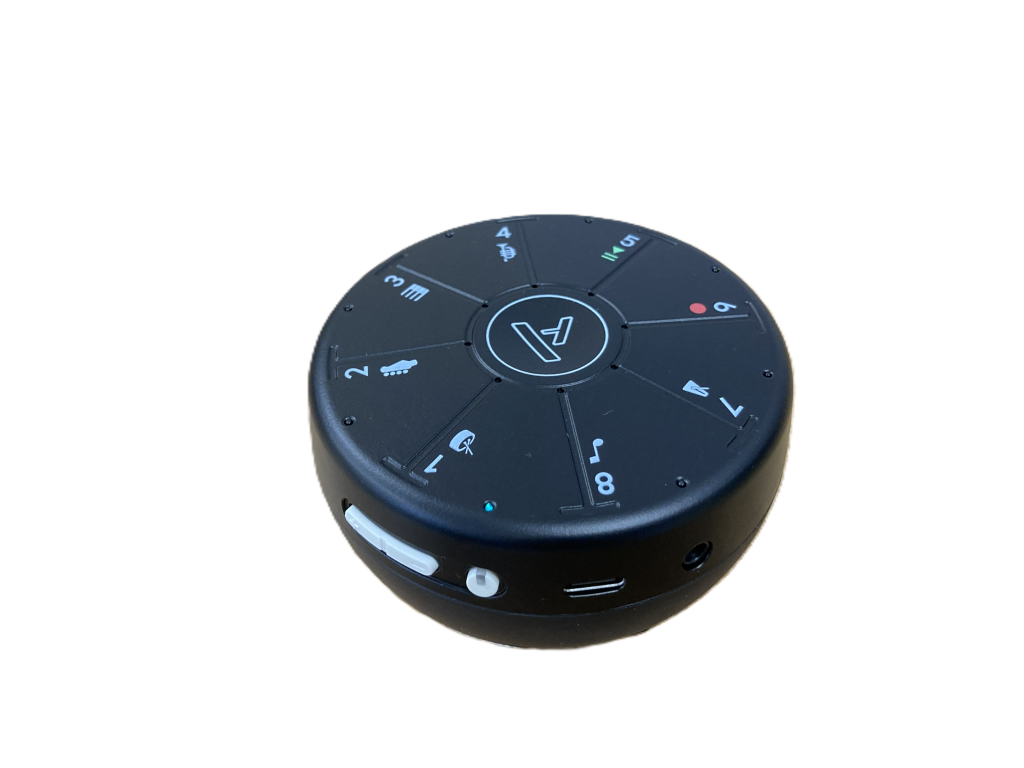
Orba 3

by Artiphon
Age range
8 years +
What’s included?
- 1 x Orba 3 device
- 1 x Easy to follow instruction guide
- 1 x MPE MIDI over USB-C lead for charging and connecting to laptop
How is it powered?
Charge it using the included MPE MIDI over USB-C lead. The Orba 3 can be used independently or whilst charging.
What is it?
The Artiphon Orba 3 is a smart, portable multi-instrument designed for musicians and creators who want to turn their ideas into music, no matter where they are. Equipped with a built-in microphone, Orba 3 makes it easy to sample any sound around you and instantly turn it into a playable instrument. With over 300 high-quality sounds, including guitars, pianos, and synths, you can explore a wide range of tones. You can also upload your own sounds via the Artiphon Connect app for even more creative possibilities.
How to set it up:
Switch on and it’s ready to use (providing it’s charged). Music making can happen instantly, by following the included ‘Quick start’ guide.
Quick start guide:
- Turn on Orba 3 by pressing the power button (found on the side of the unit).
- Start making music immediately by holding the device in the palm of your hand and tapping the eight playing pads (numbered 1 – 8).
- Hold the note and tilt the Orba 3 OR radiate in and out of the numbered segment to create sound manipulation.
- Orba 3 offers four pre-programmed parts you can layer: Drums, Bass, Chords and Melody. Each numbered pad represents a different sound/note.
- Use the central ‘A’ button to toggle between the parts (numbered segments from 1 – 4 for playing parts. Segments 5-8 offer other song recording options).
To record loops
- Hold ‘A’ button and wait for the ‘rainbow of lights’ to turn on.
- Whilst holding ‘A’, tap pad 6 (with Record icon).
- Release both pads and you’ll hear a metronome begin.
- Orba 3 starts recording when the first sound is played. Tap on the pads to create your music. Press ‘A’ button to end the loop. Orba 3 will now play back the loop so you can change to a different sound/pre-programmed part. Once selected, start playing. Orba 3 will fit the part to the loop.
- Continue layering until you’ve finished your composition.
- To end the recording, Press and hold the ‘A’ button and tap pad 5. Release both pads/buttons.
Storage requirements and dimensions:
- To be stored in a dry area, away from liquids or extreme heat
- L8cm x W8cm x H4.5cm
Why should you use it?
- It allows anyone to create music at their fingertips.
- You do not need to be an accomplished musician to use the Orba 3.
- You can use the pre-programmed sounds/instruments to create your music from scratch, or you can sample your own voice or sounds to use within a composition.
Further support
Click on the link below to follow some ‘YouTube’ simple tutorials:
DMS hire price
Special launch offer! – Any mix of five items from the Accessible Instrument and Technology Library free for the first term of hire (subject to availability). Outside of this special offer: £5.00 per instrument per term.