
Tabletop Loop Station
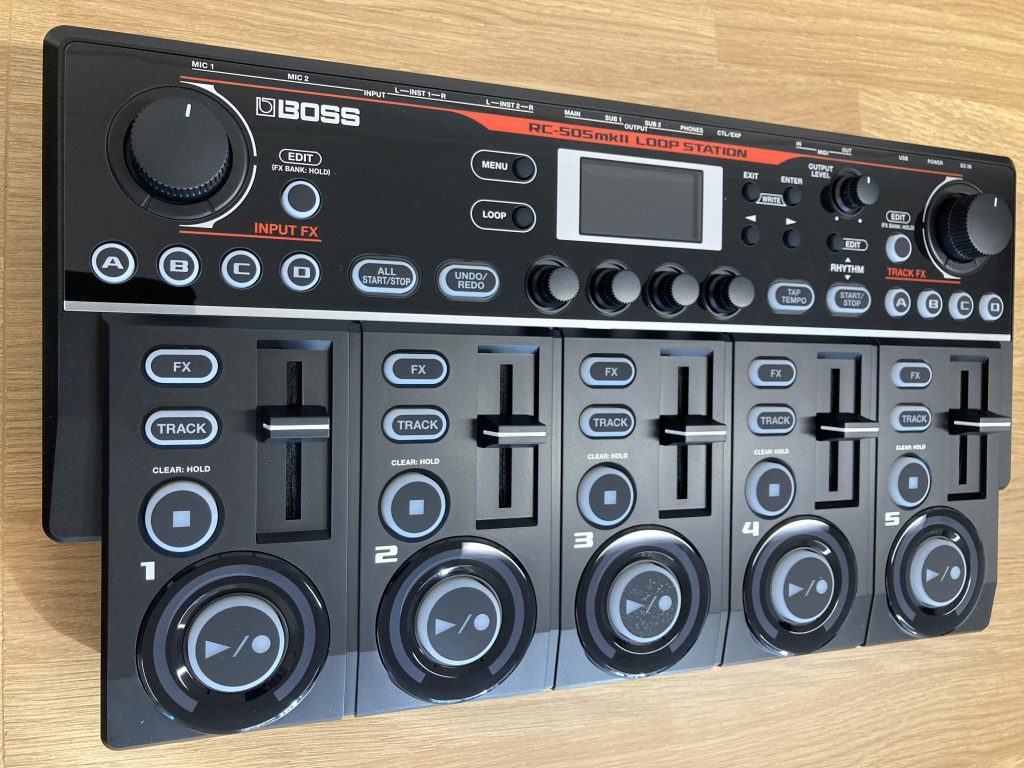
by BOSS
Age range
12 years +
What is it?
This tabletop loop station is a versatile tool for musicians of all levels offering endless possibilities for creativity and performance that can be used for a variety of purposes such as:
- Improvisation and practice: as a practice aid for accompanying oneself and honing rhythmic and melodic improvisation.
- Experimentation: providing a platform to experiment with different sounds and techniques.
- Creating complex arrangements: allowing musicians to build sophisticated and elaborate songs by layering different sounds and effects in live performances and/or studio work.
- Beatboxing and electronic music: providing a hands-on way to create and manipulate sounds.
What’s included in the set?
- Tabletop Loop Station
- AC adaptor
How is it powered?
Mains electricity with adaptor/power cable provided in the set.
How to set it up:
There are a number of set up possibilities that this tabletop loop station offers through a variety of connectors:
- 2 MIC IN XLR jacks for connecting microphones
- 2 INST IN mono/stereo 1/4 jacks for synths, guitars, etc
- 2 CTL/EXP for connecting pedals
- MIDI (IN, OUT) connectors
- USB for phrase import/export and DAW integration with computers
- 2 main OUT jacks and 2 sub OUT jacks for connecting amps, monitor speakers and/or mixer
- 1 PHONES jack: stereo ¼-inch phone type for connecting headphones
Quick start guide:
- Make sure the volume is down and turn the power on with switch at the back of the unit.
- Get ready to record by connecting microphones and/or instruments and adjusting input/output levels.
- Recording: Press the play/record button (lights red) and sing/speak into mic or play your instrument to input audio.
- Playback: Press play/record button (lights green), the recorded phrase plays as a loop.
- Overdubbing: As loop is playing, press play/record button (lights yellow). Record by overdubbing the audio (what you are playing) onto the phrase that’s playing back in a loop.
- Stopping: Press the stop button (play/record button goes dark). If you want to keep the recorded phrase, save it in a memory.
Storage requirements and dimensions:
- To be stored in a dry area, away from liquids or extreme heat
- L42cm x W23cm x H7cm
DMS hire price
Special launch offer! – Any mix of five items from the Accessible Instrument and Technology Library free for the first term of hire (subject to availability). Outside of this special offer: £5.00 per instrument per term.